Introduction
The ADAS Sensor Configuration Editor allows the BeamNG.tech user to create groupings of ADAS Sensors in a GUI environment, by using the mouse to position them and set the properties of individual sensors. Both vehicle-attached sensors and fixed-position static (map) sensors are placed and edited in this single tool. Sensor configurations are editable and can be saved/loaded to file.
The image below shows an example of a typical ADAS sensor configuration comprising Camera, LiDAR, RADAR, Ultrasonic, IMU and GPS sensors.
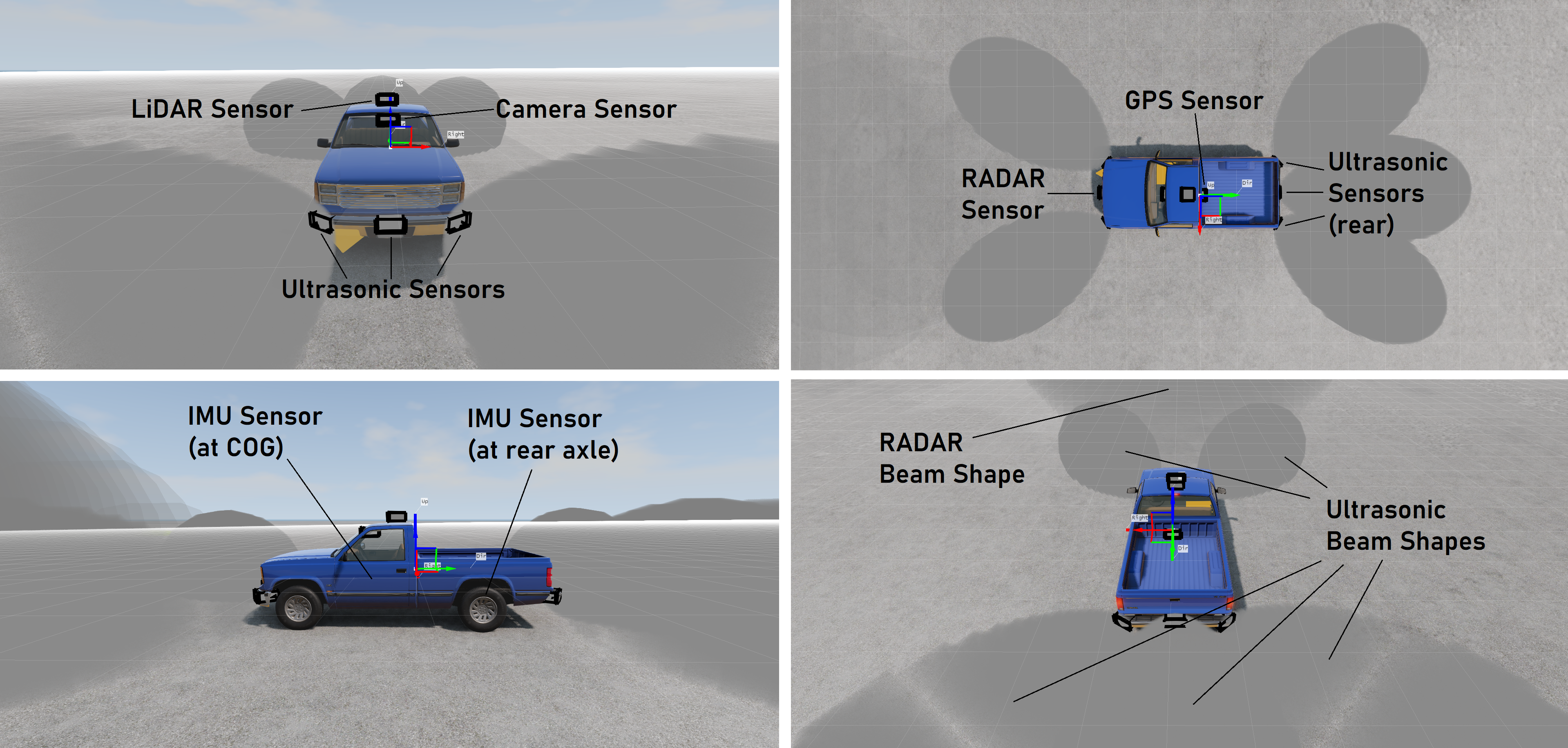
The Sensor Configuration Editor can be found in the mode bar of the World Editor.
Both vehicle-attached and map sensor configurations are compatible with BeamNGpy, where pre-saved sensor configurations can be loaded and BeamNGpy-based scenarios can be executed using these configurations with the positions and properties set in the GUI environment.
Vehicle-Attached Sensors:
The full suite of BeamNG ADAS sensors can be attached anywhere on (or relative to) any loaded vehicle. Multiple instances of positional sensors are allowed (non-positional sensors are limited to one per vehicle). Together, these can be saved as a ‘configuration’ and recalled later as required.
Sensor positions and rotations are editable with the mouse and standard World Editor gimbal controls, and the sensor properties are editable within GUI windows.
Map Sensors:
A selection of supported sensors (Camera, LiDAR, Ultrasonic, and RADAR) can also be placed directly on the map at fixed world-space positions from the Map Sensors section of the Main Tool Window. Using this, the user could for example set up a ‘smart highway’ with cameras or other sensors to detect traffic or perform other measurements.
Note: map sensors support only Camera, LiDAR, Ultrasonic, and RADAR, since vehicle-specific sensors (such as IMU, GPS, or Powertrain) require an attached vehicle.
Was this article helpful?