Slots2
This feature is supported as of BeamNG.tech and .drive version 0.31 to latest.
Slots2 is an improvement to the Slots section, designed and implemented in preparation for a new slots system planned for future updates of the game. As of now, it offers no clear advantages over the standard Slots section. The main difference is separating slot type into the actual slot name and lists of allowed and denied slotTypes for this slot. You can use both Slots and Slots2 in different Jbeam files of the vehicle.
Required arguments
In case of direct conversion from slots, the old content of “type” in that section becomes the only element of this table.
Allows applying parts with multiple slotType variations into the same slot.
In case of direct conversion from slots, this table will be empty.
This has a higher priority than allowTypes: If a part contains 2 slotTypes, one allowed and one denied, it will be denied.
Optional arguments
Variable names must start with the $ symbol. Example usage:
["log_trailer_bolsters_R","log_trailer_bolsters_R","Rear Bolsters", {"variables": {"$bolster_offset":-0.39}}],
Commonly passed arguments
These are arguments of Nodes, Flexbodies and Props sections, that are almost exclusively used as optional arguments in Slots section to pass their values to those. They affect the part in question and all its child parts until the value is reset back to 0.
All of the argument names below can have a single digit suffix (1-9) appended which determines the order, e.g.
"nodeRotate1": {"x": 0, "y": 0, "z": 45}
"nodeMove2": {"x": 0, "y": 0, "z": 0.2},
"nodeOffset3": {"x": 0.1, "y": 0, "z":0},
"nodeRotate4": {"x": 5, "y": 0, "z": 0}
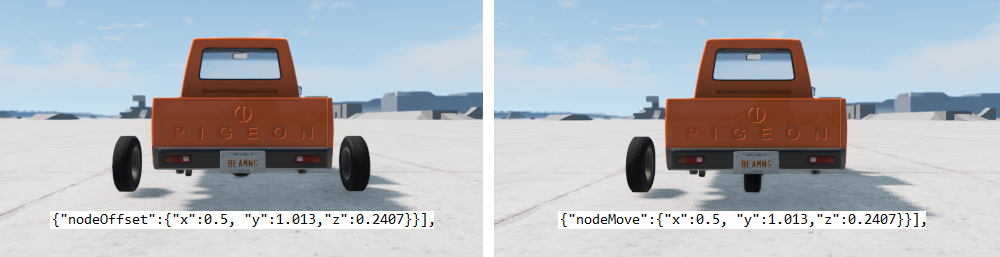
Operations with lower order number will be carried out first. No number specified has the same order as 0. Order of node transformations with the same suffix is: nodeRotate, nodeOffset, nodeMove. When the same suffix (or no suffix) is used twice, the one in the child slot will overwrite the one in the parent slot.
Node transformations are intrinsic, meaning that translations and rotations apply around the axes of the previously transformed frame. For example, a "nodeRotate1": {"x": 0, "y": 0, "z": 45} would rotate the frame around it’s Z axis by 45 degrees. A subsequent "nodeRotate2": {"x": 15, "y": 0, "z": 0} would rotate the newly oriented frame around it’s X axis by 15 degrees.
x, y, z degrees on XYZ axis, around the center point px, py, pzIf no pivot point is defined, the rotation is done around the origin, e.g. "nodeRotate":{"x":-45, "y":0, "z":0} will function the same way as "nodeRotate":{"x":-45, "y":0, "z":0, "px":0, "py":0, "pz":0}.
Due to concerns related to
gimbal lock
, when rotating around more than one axis, it is best to only specify one axis rotation per nodeRotate instance. For example, instead of {"nodeRotate":{"x":90, "y":45, "z":0}}, it is better to use: {"nodeRotate1":{"x":90, "y":0, "z":0}, "nodeRotate2":{"x":0, "y":45, "z":0}}.
Simple Example
A standard use of slots2, with no difference in behavior from the standard slots section.
"slots2": [
    ["name", "allowTypes", "denyTypes", "default", "description"],
    ["pickup_frame", ["pickup_frame"], [], "pickup_frame", "Frame", {"coreSlot":true}],
    ["paint_design", ["paint_design"], [], "", "Paint Design"],
    ["skin_glass", ["skin_glass"], [], "", "Glass Tint"],
    ["licenseplate_design_2_1", ["licenseplate_design_2_1"], [], "", "License Plate Design"],
    ["pickup_mod", ["pickup_mod"], [], "", "Additional Modification"],
],
Advanced Example
Use of slots2 together with nodeMove and slot variables.
"slots2": [
        ["name", "allowTypes", "denyTypes", "default", "description"],
        ["simple_traffic_suspension_F",["simple_traffic_suspension_F"],[],"simple_traffic_suspension_F","Front Suspension",
        {
            "nodeMove":{"x":0.0, "y":-1.456, "z":0.00},
            "variables": {
                "$suspFUpperMountPosX":0.37,
                "$suspFUpperMountPosZ":0.57,
                "$suspFLowerMountPosX":0.37,
                "$suspFLowerMountPosZ":0.35,
            },
        }
        ],
        ["simple_traffic_suspension_R",["simple_traffic_suspension_R"],[],"simple_traffic_suspension_R","Rear Suspension",
        {
            "nodeMove":{"x":0.0, "y":1.487, "z":0.00},
            "variables": {
                "$suspRUpperMountPosX":0.43,
                "$suspRUpperMountPosZ":0.56,
                "$suspRLowerMountPosX":0.65,
                "$suspRLowerMountPosZ":0.31,
            },
        }
        ],
    ],
Component with multiple slot types.
"semi_R_suspension_single_leaf": {
    "slotType" : ["us_semi_suspension_R_single","us_semi_suspension_R_tandem"],
},
Was this article helpful?
