Steam Deck and Linux Issues
The Steam Deck version of BeamNG uses the native Linux binary and Vulkan renderer by default for better performance and reduced power consumption. The Steam Deck and native Linux version might suffer from some specific issues. This page provides instructions how to deal with some of them.
Steam Deck & General Troubleshooting
Check whether Steam is using native Linux or Proton
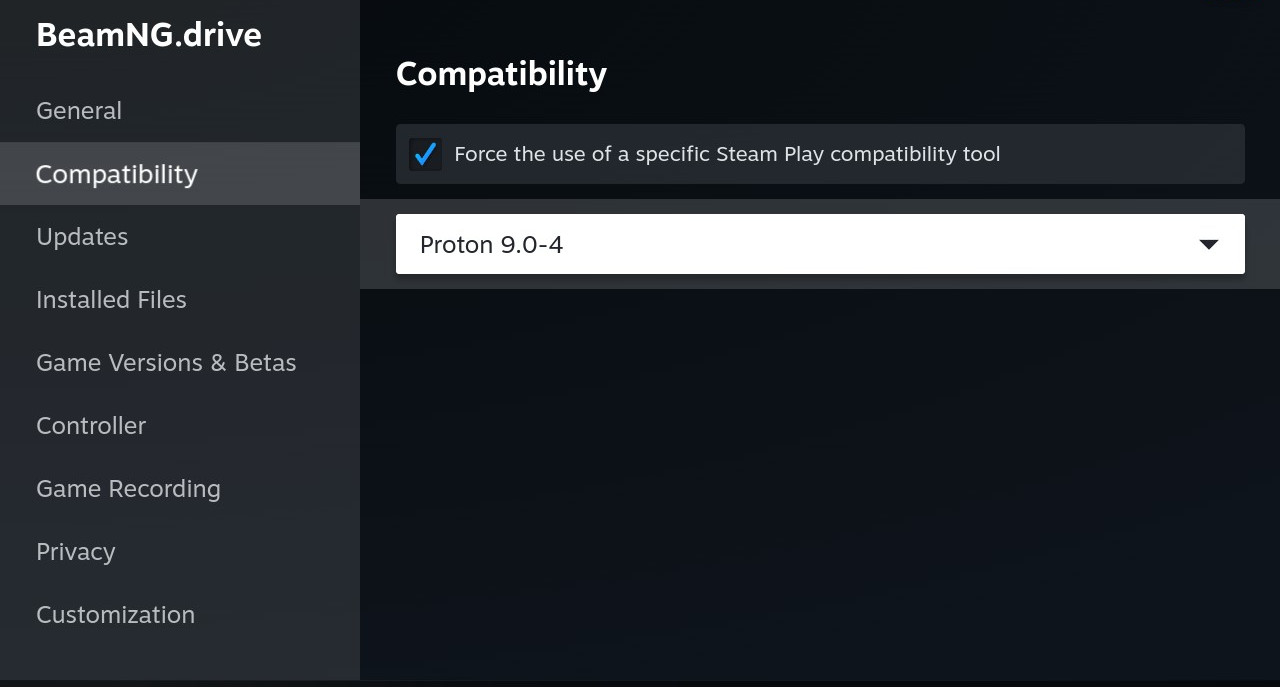
Open Steam → BeamNG.drive → Properties → Compatibility.
- If “Force the use of a specific Steam Play compatibility tool” is disabled, Steam uses the native Linux version by default.
- If it is enabled and a Proton version is selected, Steam runs the Windows version through Proton.
Temporarily clear custom launch options while troubleshooting, as they may override the expected behavior.
User folder and logs
The native Linux user folder is located at:
${XDG_DATA_HOME:-$HOME/.local/share}/BeamNG/BeamNG.drive/current
In most cases, this is ~/.local/share/BeamNG/BeamNG.drive/current. The current session log is beamng.log in this directory; numbered logs such as beamng.1.log are from earlier sessions. Include these files when reporting an issue
.
Lost data after switching from Proton to native Linux
In January 2026 we switched the default launch option on Steam Deck and other Linux systems from Proton (an emulation layer running the Windows binary) to our native Linux binaries. As the user folders of these two versions are not in the same location, you might have lost your settings or installed mods. You can follow one of the following options to get them back:
Option A (recommended) - temporarily switch to Proton and transfer files using Steam Cloud
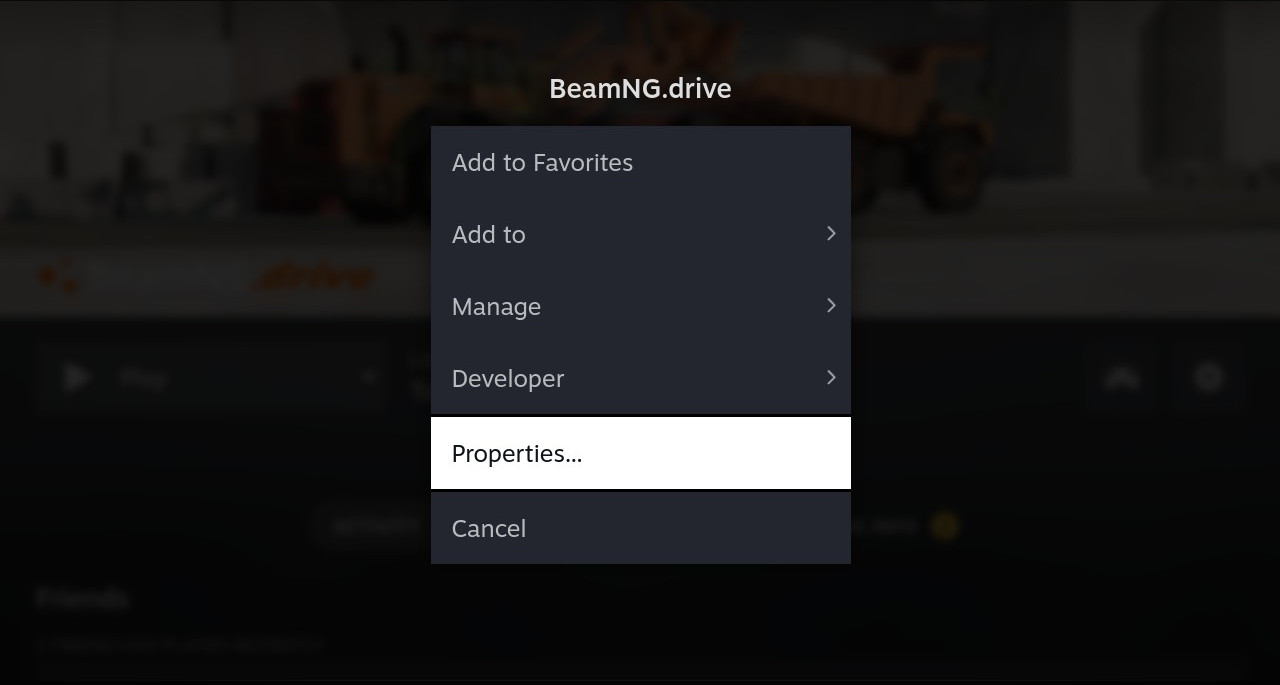
- In Steam, go to BeamNG.drive properties, check the option “Force the use of a specific Steam Play compatibility tool”, and choose a version of Proton from the list shown.
You have to use either Proton 10.0-4 or Proton Experimental, as based on our tests these are the only versions that work with the Steamworks SDK version we use.
-
After you set the compatibility tool, run BeamNG once while the Steam Deck is connected to the internet and make sure Steam Cloud is enabled. It is enough to go to the main menu and press “Quit”. Settings and other user data are going to be copied to the Steam Cloud.
-
Go back to the “Compatibility” tab in BeamNG.drive properties and uncheck the checkbox. This will make BeamNG run the native version again and it will synchronize the data from the Steam Cloud on the next run.

Option B - copy the data to the native Linux location
You will need to use the Linux terminal, which you can access in the “Desktop Mode” on Steam Deck. Press the “Steam” button and choose “Switch to Desktop”.

In Desktop Mode, open a terminal and run the following commands to copy the Proton user folder to the native Linux user folder location.
mkdir -p ~/.local/share/BeamNG
cd ~/.local/share/Steam/steamapps/compatdata/284160/pfx/drive_c/users/steamuser/AppData/Local/BeamNG/
cp -r BeamNG.drive ~/.local/share/BeamNG
Option C - keep running the Proton version
Follow the steps from Option A, but stop after setting the compatibility tool to Proton 10.0-4 (step 1). This will make BeamNG keep using the Windows version with the Proton compatibility layer and the previous user folder.
The Proton version might suffer from performance loss over the native Linux version.
Advanced Desktop Linux Configurations
GPU Drivers on Linux
The native Linux version of BeamNG.drive runs exclusively on the Vulkan renderer . Having the correct, fully-featured Vulkan drivers is critical.
AMD Radeon
- GCN 3 / Polaris and newer (Recommended): Use the open-source RADV driver (usually
vulkan-radeonormesa-vulkan-drivers). It is the high-performance default used on Steam Deck. Avoid AMDVLK or AMDGPU-PRO on modern cards. - GCN 1 & 2 (e.g., HD 7000, R9 200/300):
To run the game, force the modern
amdgpukernel driver by adding these parameters to your kernel command line:Additionally, you must use the AMDVLK driver instead of RADV. The RADV driver disables sparse residency features on GCN 1 & 2 to prevent hangs, but BeamNG.drive requires these features to start. AMDVLK retains sparse residency support on these cards, making it mandatory to run the game.radeon.si_support=0 radeon.cik_support=0 amdgpu.si_support=1 amdgpu.cik_support=1
NVIDIA GeForce
- Recommended: Use the official proprietary NVIDIA driver (
nvidia-driver). This is required for full Vulkan 1.3 feature completeness and performance. - Nouveau & NVK (Open-source): Not supported. They currently lack the performance, stability, and Vulkan 1.3 features required to run the game.
Intel Graphics
- Recommended: Modern Intel hardware is supported via the open-source ANV driver (shipped with Mesa).
- Older Intel iGPUs (11th Gen and older): Many older integrated graphics chips do not support Vulkan 1.3 and are unsupported.
Avoiding out-of-memory crashes with swap and zram
BeamNG.drive can use more than 16 GB of memory. Systems without enough RAM and swap may close the game when memory runs out. Swap can prevent such crashes, although performance will decrease while it is heavily used.
Check whether swap is already enabled:
swapon --show
zram stores compressed swap in RAM and is faster than disk swap. A disk swap file or partition provides additional fallback when zram fills up. We recommend enabling both on systems with limited memory, with zram set to a higher priority than disk swap.
Setup differs between distributions and filesystems. Useful guides include:
Using ext4 casefold for the user folder
Linux filesystems are normally case-sensitive. BeamNG.drive can perform better when the user folder
uses case-insensitive file lookup. On ext4, the casefold feature provides this for selected directories while preserving the original filename casing.
Casefold is most important for the user folder. That is where settings, mods, levels, replays, and other custom files are stored. Installing or editing mods and levels there works best on a casefolded directory. The Steam library or other install location for the game binaries does not need casefold.
casefold. Use a separate data partition for the user folder if possible. Do not enable it on a filesystem used by GRUB or OverlayFS-based tools such as Docker or Podman, as they may no longer work with that filesystem.Enable the casefold feature on the ext4 partition that will contain the user folder. Follow the ArchWiki
ext4 case-insensitive mode guide
or the
Linux kernel ext4 documentation
for the commands and current compatibility limitations.
When the partition supports casefold, BeamNG.drive enables it on the user folder automatically during creation. A manual chattr +F step is not needed for a new install.
For an existing user folder, back it up, recreate the directory on a casefold-enabled ext4 partition, and copy the contents back. Do not move existing subdirectories into it, as they will not inherit the attribute.
Feedback and discussion
Was this article helpful?
